


Quintuple room (two bedrooms)
-
Package Price
Provider package price

Shad-e-Toos Hotel Apartment
Accommodations
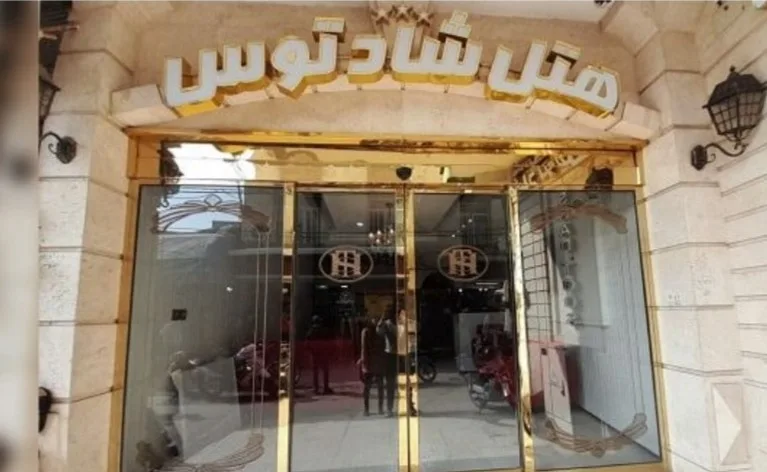
Shad-Toos Hotel Apartment, Mashhad
Established in 2003, Shad-Toos Hotel Apartment is located on Tabarsi Street, just a 2-minute walk from the Holy Shrine of Imam Reza (AS). As a highly-rated 2-star budget hotel, we offer 35 comfortable rooms, including double, triple, and quadruple options.
One of the most remarkable features of Shad-Toos Hotel is its prime location directly facing the Holy Shrine, offering guests a breathtaking view of the golden dome of Imam Reza (AS).
If you are looking to shop for local souvenirs or explore the city, the historic Reza Bazaar—one of the oldest markets in Mashhad—is only a 7-minute walk away, where you can find a wide variety of traditional gifts and local goods.
Important Information
- • This service can be booked without choosing a specialist first
- • This service uses date-range availability
- • No upload requirement is configured for this service yet
- • Final treatment plan and price can depend on provider assessment
Providers offering this service
Compare clinics and providers that can deliver this treatment.
Similar services near you
Compare trusted alternatives in IR
Patient Reviews
Provider policies
Cancellation Policy
Cancellations up to 24 hours prior to check-in are penalty-free, and a full refund will be provided.
Admission Policy
Room check-in time: 2:00 PM
Room check-out time: 12:00 PM
House Rules
Check-in for single and married guests: Allowed.
Half-charge until 6:00 PM, subject to availability and provided the rooms are not booked.
Frequently asked questions
What does the price of this service include?
Check “What's Included” on this page. If the service is sold as a package, you'll see the package price and any saving. A price converted from another currency is marked “Converted from” with the original amount. The final treatment plan and price can depend on the provider's assessment. Current deals and their codes are under “Active offers”, and you enter a coupon at “Review & Pay”.
Which providers offer this service, and how do I compare them?
“Providers offering this service” lists the clinics and providers that deliver it, with their price and details such as location, rating and response time where listed. Tap one to open that provider's version of the service, or open the provider's own page to compare policies, languages and reviews. If there are many, tap “Show more” to see the rest.
Do I need to choose a specialist for this service?
It depends on the service. Under “Important Information”, the page says either “Specialist selection may be required during booking” or that the service can be booked without choosing a specialist first. The “Specialists” section lists who performs this service; tap a name to open their profile, places of work and credentials.
How do I choose a date and time, and when is my booking confirmed?
Tap “Book Now” and pick a date and time in the “Schedule” step, where only available times are offered. Stays and other date-range services ask for start and end dates instead. Availability is confirmed during booking. Some providers review each request, so your booking may show “Pending confirmation” until the provider confirms it. You can follow the status in “My bookings”.
What documents do I need for this service?
Check “Requirements before booking” on this page. It lists each document the provider asks for, marks the mandatory ones, and gives the file count and size limits. Medical or identity documents may be requested. If you ask LSevin to arrange extra support services while booking, you upload them in the “Files” step, and they appear later under “Uploaded documents” in your booking.
Can I change or cancel my booking?
To cancel, open the booking in “My bookings”, tap “Cancel booking”, add a reason if you like, and confirm. There's no reschedule button in the app, so to move to another time, book the new slot and then cancel the old one, or contact LSevin support for help. Paid amounts may be refundable depending on the provider's policy, which you'll find under “Provider policies”.